Adobe Express: AI Photo, Video
- 4.6
- Rating
- 100.00M
- Installs
- Free
- Price

 Analysis by App-foxy
I approached Adobe Express as a practical mobile design tool rather than as a replacement for a full desktop editor. It is an app for Art & Design from Adobe, and its focus is clear: helping me turn photos, short videos, text, and ready-made visual ideas into something presentable without starting every project from a blank canvas. After using it for everyday creative tasks, I found it most convincing when speed matters more than deep manual control.
The app is free to install and suitable for Everyone, which makes it approachable for casual users, students, small businesses, and anyone who needs a quick social post or announcement. It also includes optional in-app purchases ranging from around ten dollars to one hundred dollars per item, so I would treat the free experience as a way to test the workflow before committing to anything paid. That distinction matters because the convenience of a guided design app can be appealing, but not every useful asset or advanced option necessarily belongs to the no-cost part of the experience.
What Adobe Express feels like in everyday use
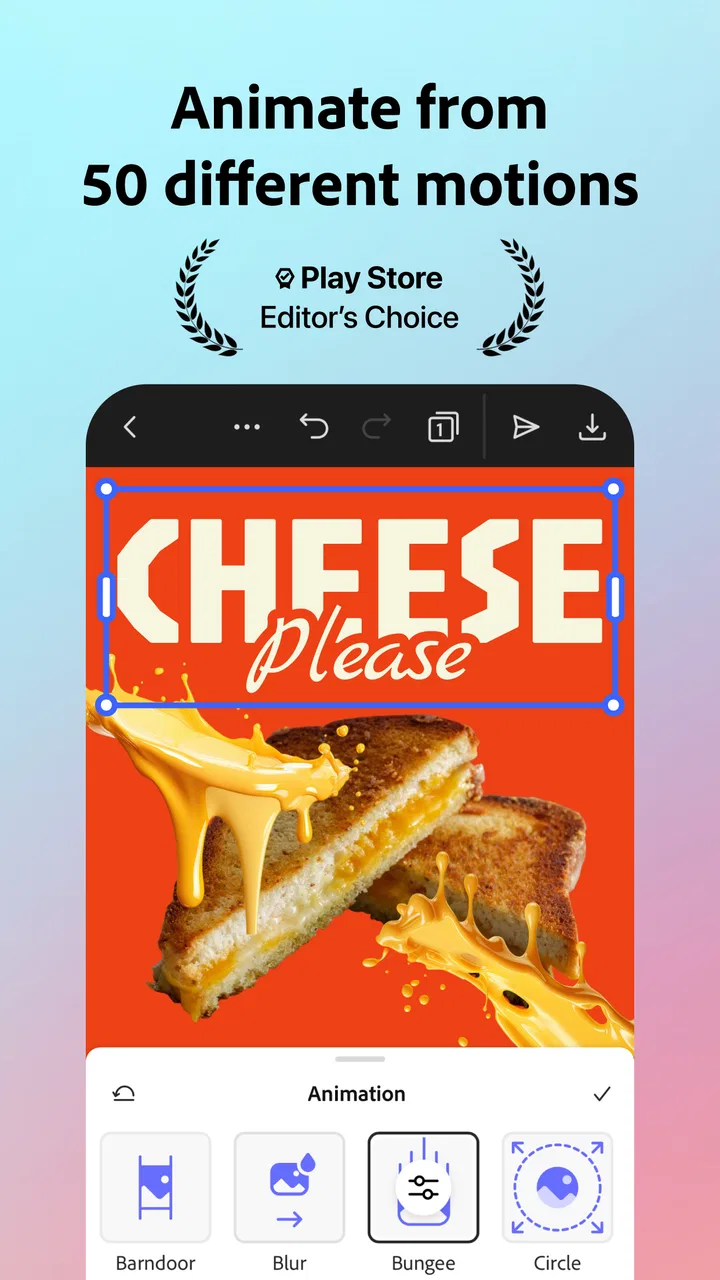
The first thing I noticed is that the app is built around reducing the number of decisions I have to make. Instead of asking me to choose a canvas, set up layers, and decide on every visual detail immediately, it encourages a faster route from an idea to a finished piece. That is especially useful when I need a birthday invitation, a simple event graphic, a thumbnail, a promotional image, or a short vertical video and do not want to spend an evening learning a complicated editor.
You May Also Like

 AccuWeather: Weather Radar
AccuWeather Review: A Quick, Clear Forecast for Everyday Decisions
For everyday plans, the best forecast is the one you can understand quickly. AccuWeather makes rain timing, radar, and local conditions easy to act on, with a few trade-offs.

 Hill Climb Racing
Why Hill Climb Racing Still Turns Crashes Into One More Run
A tiny car, a bumpy hill and one more upgrade: Hill Climb Racing keeps resurfacing because its simple chaos makes every near-miss feel personal.

 AliExpress - Shopping App
AliExpress Makes Global Shopping Feel Personal, but Shoppers Bear the Risk
AliExpress turns a global marketplace into a pocket-sized discovery engine. Its reach is useful, its shopping loop compelling, and its trade-offs easy to miss.

 Lords Mobile: Kingdom Wars
Lords Mobile Is a Kingdom-Building Routine, Not a Quick Match
A case-by-case verdict on the building, battles, device demands, and social commitments that make Lords Mobile rewarding for some players and exhausting for others.

 PDF Scanner app - TapScanner
TapScanner Makes Paperwork Easier to Capture, Check, and Share
TapScanner makes scanning with a phone feel less like a rescue operation and more like a dependable step in getting work done. Its capture tools are useful, though not flawless.

 Block Blast!
Block Blast! Shows How Much a Puzzle Game Can Leave Out
A quiet grid game shows why puzzle players increasingly value instant clarity, repeatable skill and low-pressure play—and where the genre still needs to catch up.
More From Our News Desk
View All News


Adobe Express also has an AI-oriented approach to creation. I see that as helpful when I have a rough concept but lack the time or confidence to build it manually. The important practical point is that generated or assisted material should be treated as a starting point, not as a final answer. I still need to check spelling, make sure the visual hierarchy is sensible, and confirm that the result actually communicates what I intended.
Quick Actions are one of the most useful ideas in the app. They turn common jobs into focused tasks instead of making me search through a large editing workspace. A person who only wants to remove a background, adjust an image, prepare a social asset, or make a quick video edit can usually think in terms of the result they want rather than the technical process behind it.
That makes the app particularly friendly for people who do not identify as designers. I can imagine recommending it to a friend who runs a local club, posts products online, or needs polished visuals for a school project. It gives that person a better chance of producing something coherent than a completely blank editor would.
Why the Adobe name affects trust
Adobe is the developer, and that gives the app a different context from a small unknown utility. The product sits within a familiar creative software family, so I expect its interface to be more considered than a disposable template app. At the same time, a recognizable developer does not remove the need to pay attention to account choices, content handling, and what happens when I use cloud-connected or AI-assisted workflows.
I found the trust question less about blindly believing the brand and more about staying aware of what I am doing. When I work with a private photograph, a personal document, or an image containing someone else, I should pause before sending it into any online-assisted process. That is sensible behavior with any modern creative service, and it is especially important when convenience features make uploading feel almost automatic.
The app has a 4.6 average from roughly 673 thousand ratings, with about 10 thousand written reviews. It has also passed 100 million installs, which shows that it is not a niche experiment. Those figures tell me that many people have tried it, but they do not guarantee that every workflow will suit me. A large user base is useful context, not a substitute for checking the controls on my own device.
Where the fast workflow saves real time
A realistic example is preparing a last-minute notice for a community event. I could begin with a photo, add the event name, include the time and location, and adapt the same visual for a story or a square post. In a traditional editor, the hardest part might not be the actual design; it might be remembering the right dimensions, spacing, and export steps. Express helps by keeping the job centered on the communication rather than on setup.
Another useful scenario is a small online seller who has several product photos but no consistent visual style. Instead of editing every image from scratch, I could create one recognizable layout and reuse its structure. The benefit is not only speed. Repetition makes a small brand look more organized, even when the person behind it is working alone.
For short video, I see the strongest use case in lightweight social content rather than serious filmmaking. A quick montage, announcement, or captioned clip can be assembled without the intimidation of a professional timeline. The trade-off is that users who need detailed audio mixing, precise keyframes, complex compositing, or frame-by-frame control will probably outgrow it.
Three workflows that make the app more useful
My first practical tip is to separate creation from approval. I would make a rough version quickly, then review it at normal phone size before exporting. Templates and AI assistance can produce attractive compositions that fail in small details: a headline may be too long, a face may be cropped awkwardly, or a button-like element may not be obvious enough. A second review is where the actual quality often comes from.
My second tip is to keep a small set of dependable visual choices instead of changing everything for every post. Consistent type treatment, colors, and spacing are more valuable for a local project than endlessly chasing new styles. Express is good at helping me produce variations, but that flexibility can also encourage visual inconsistency if I accept every suggestion without a plan.
My third tip is to use Quick Actions for repetitive preparation, then move into the broader editor only when the result needs personality. For example, I might handle a basic image cleanup first and then spend my attention on the headline, crop, and order of information. This division prevents me from wasting creative energy on mechanical steps while still leaving room for human judgment.
A less obvious trade-off is that speed can hide mistakes. When an app makes a task feel effortless, I am more likely to publish without checking the source image, text accuracy, or final crop. I would be especially careful with dates, prices, addresses, and names. A fast design that contains one incorrect detail is less useful than a plain design that is correct.
What to watch when personal content is involved
The most data-sensitive moments are the ones involving personal photos, identity documents, private screenshots, or images of children. I would not treat an AI-powered creative workflow as a neutral offline action. Before using a sensitive file, I would ask whether the same result can be achieved with a less personal image, whether the project really needs that file, and whether I am comfortable with the account and service choices presented on screen.
I also recommend checking the visible settings rather than tapping through them automatically. Account menus, sharing choices, project visibility, and any prompts connected with online assistance deserve a quick look. The exact options I see can depend on the current app experience and account state, so I would rely on what is displayed in my own installation instead of assuming that a setting works the same way for every person.
That approach is not meant to make the app sound unsafe. It is simply a good habit for any tool that combines images, video, accounts, and assisted creation. Trust comes from understandable choices and deliberate use. If I am preparing an ordinary public flyer, the concern is modest. If I am handling confidential material, I would slow down and choose the workflow more carefully.
Account control and the role of paid options
Because the app is free to download, I can try the basic experience without making an immediate purchase. That is a genuine advantage for undecided users. I can learn whether the editor feels comfortable, whether the templates match my taste, and whether the available workflow is enough for my projects before considering an upgrade.
The presence of in-app purchases changes how I evaluate the app. I would not assume that every attractive asset, assisted feature, or export-related convenience is included at no cost. Instead, I would check the label attached to an item before building an entire project around it. Discovering a paid requirement late in the process is frustrating, particularly when I have already spent time customizing a design.
For a person creating occasional invitations or personal posts, the free route may be sufficient. Someone producing regular marketing material may find paid access more reasonable if it removes repeated friction. I would still compare the total value with other design subscriptions, especially if I already pay for another Adobe product or need only one narrow function.
The current version is 29.5.0, and the minimum operating system is 10. That makes compatibility worth checking before installation, particularly on an older phone or tablet. A person using a recent device is less likely to think about this, but anyone with an aging handset should confirm that the app can run properly before planning an important project around it.
How it compares with familiar alternatives
Compared with a basic phone gallery editor, Express offers a much stronger route from a raw image to a designed communication. A gallery editor is faster for cropping, rotating, and making simple adjustments, but it usually does not give me the same design-oriented structure. If all I need is a brighter photo, I would use the gallery. If I need text, layout, and a reusable visual format, Express is the better fit.
Compared with a template-first design service, Adobe Express feels attractive to me when I want a balance between guidance and Adobe’s broader creative identity. A template service may feel more immediately focused on social posts, while Express is useful across photo, graphic, and short-video tasks. The best choice depends on whether I value a very narrow, simple workflow or a broader creative workspace.
Compared with a professional desktop editor, Express is clearly the lighter option. That is not a criticism; it is the reason many people will prefer it. I would choose the mobile app for speed, portability, and approachable controls. I would choose a desktop tool when exact color work, detailed masking, complex layers, or production-level video editing matters more than convenience.
There is also a difference between using Express and relying on an AI image generator alone. A generator can help produce an idea, but a finished communication still needs typography, hierarchy, cropping, and context. Express is more valuable when the goal is a usable piece of content rather than an isolated picture. I would judge its AI assistance by how well it supports the entire job, not by how surprising one generated result looks.
Who should use it, and who should skip it
I think the app is a strong match for beginners, busy creators, students, community organizers, independent sellers, and social users who want better-looking results without studying design software. It is also useful for people who work from a phone and need to make a change while away from a computer.
I would be more cautious about recommending it to someone who wants complete offline independence, highly technical editing, or a single-purpose tool with no extra creative surface. If a user only needs occasional photo cropping, the app may feel larger than necessary. If a user produces professional video or print work with strict technical requirements, a more specialized editor is likely the better investment.
I would also tell privacy-conscious friends to be selective with source material and to inspect account prompts before using connected features. That does not cancel out the app’s usefulness; it simply means convenience should not replace judgment. The right question is not whether every project deserves the same level of caution, but whether the content is sensitive enough to justify a slower decision.
My cautious verdict
After using it as a mobile creation tool, I see Adobe Express as a practical middle ground. It is more capable than a basic photo editor, less demanding than professional creative software, and especially effective when I need a polished visual quickly. Its best quality is not any single effect. It is the way it helps me move from a vague idea to a usable photo, graphic, or short video without getting stuck in technical setup.
I would recommend starting with a small, ordinary project and learning the workflow before relying on it for important work. Check which elements are free, review the final design carefully, and pay attention to the choices shown when using account-based or AI-assisted features. Those habits make the experience more predictable and help me keep control over what I create and share.
Adobe Express is free to try, rated for Everyone, and developed by Adobe, but its broad reach should not persuade me to ignore its limitations. It is not the right answer for every editing job, and its optional purchases deserve a deliberate look. For quick, attractive mobile content with enough flexibility to grow beyond basic templates, though, I find it easy to recommend to a friend who wants creative results without a steep learning curve.
FAQs for Adobe Express: AI Photo, Video
01What features does Adobe Express: AI Photo, Video offer?
Adobe Express: AI Photo, Video provides a range of features, including AI-powered photo and video editing tools. Users can create stunning visuals with filters, effects, and transitions. The app also supports text overlay, music integration, and easy sharing options. It's designed to cater to both beginners and advanced users.
02Is Adobe Express: AI Photo, Video suitable for beginners?
Yes, Adobe Express: AI Photo, Video is ideal for beginners due to its intuitive interface and simple navigation. The AI-driven tools assist users in creating professional-quality edits without needing extensive technical knowledge. Tutorials and tips are available within the app to help users get started quickly.
03Does Adobe Express: AI Photo, Video require an internet connection?
While Adobe Express can perform basic editing functions offline, an internet connection is necessary for accessing cloud-based features, downloading templates, and sharing projects directly from the app. The online connectivity enhances the overall functionality and provides users with the latest updates and resources.
04Is there a cost associated with Adobe Express: AI Photo, Video?
Adobe Express is available for free, offering a variety of tools at no charge. However, there are premium features and additional content available through a subscription model. These include advanced editing tools, exclusive effects, and additional cloud storage, enhancing the creative potential for users.
05What devices are compatible with Adobe Express: AI Photo, Video?
Adobe Express: AI Photo, Video is compatible with both Android and iOS devices. It supports a wide range of smartphones and tablets, ensuring users can edit on the go. Regular updates ensure compatibility with the latest operating systems, providing a seamless experience across all devices.
Pros
- User-friendly interface for quick edits.
- Wide range of templates available.
- Integrates seamlessly with Adobe cloud.
- AI tools enhance photo quality effortlessly.
- Supports both photo and video editing.
Cons
- Requires subscription for premium features.
- Large app size may consume storage.
- Occasional lag on older devices.
- Limited customization in free version.
- In-app purchases can be pricey.

Adobe Express: AI Photo, Video
Gallery